|
1. |
Open
Microsoft Office Word 2003.
(If you already have Word open, close and re-open it.)
Open the
Blue Whales Report
from the Sample Files Folder. |
|
|
|
|
2. |
Click the
File
menu and click
Page Setup.
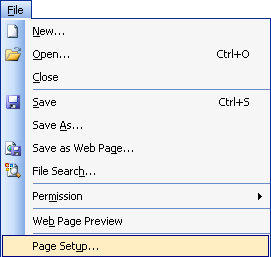
On the
Margins
tab, change the Orientation to
Landscape.
Click the
Layout
tab and change the Vertical Alignment to
Centre.
Click
OK. |
|
|
|
|
3. |
Click the
File
menu and click
Print.
In the Page Range
section, click the
Pages
option. Type
1,2
in the text
box.
For number of
copies, type
2. |
|
|
|
|
4. |
Click the
Options
button.
Under the Printing
Options section, check
Draft Output.
Under the Include
with Document section, check
Hidden Text.
Click
OK. |
|
|
|
|
5. |
Click
Print. |
|
|
|
|
6. |
Press Ctrl + N to
create a new document. |
|
|
|
|
7. |
Type these
sentences:
I just printed a report on blue whales. Now I am going to print
my own document.
You can make these
sentences any font, size, or colour you want. |
|
|
|
|
8. |
Click the
Print
icon on the standard toolbar. |


