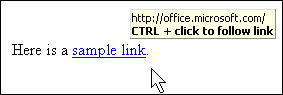
If you place your mouse over a hyperlink, it will look like the sample below. A small gold window will appear above the link telling you what it points to. This is especially important if it isn’t immediately obvious what clicking on the text will do, like in the sample photo. You certainly don’t want to click on a link that will give you a virus!
If the link looks OK, hold down the Ctrl key and click it the blue text. If it’s a hyperlink, your Internet browser will open to the page specified in the link. If it’s a mailto link, your e-mail program will open a blank message. The e-mail address and the subject (if specified) will already be filled in; all you have to do is type in the body and send it.
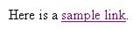
Once you’ve
followed a hyperlink, it will turn purple:
You can still use it, though, by holding the Ctrl key and clicking it.
Following a hyperlink is really easy; just make sure you know where you’re being taken to before you click on the link.
|