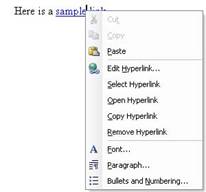
After you have inserted a hyperlink or a mailto link, you can edit it by right-clicking on it. Let’s take a look at the hyperlink context menu and each of its options.
|
After you have inserted a hyperlink or a mailto link, you can edit it by right-clicking on it. Let’s take a look at the hyperlink context menu and each of its options.
|