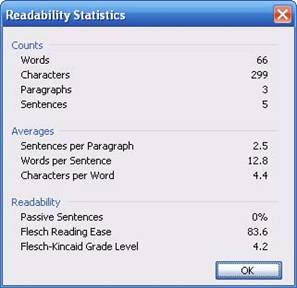
If you check the Show readability statistics box, you will see this window after doing a spelling and grammar check:
From the sample above, you can see that this window displays lots of information. Most of the fields are self-explanatory; the Readability section ranks your document’s readability ease. The second item in this section indicates where the document falls on the Flesch Reading Ease scale. This scale ranks documents between 1 and 100, where a higher score indicates easier reading. After the Flesch Reading Ease rating, the document is rated by grade level. In the sample above, this scale says the document is written at a grade four level. (Most business documents should be written at a grade eight or nine level.)
Using word count and readability statistics can be useful in a number of situations. If you’re writing a college paper and the Flesch Grade Level says 1, you know that your paper isn’t written at the proper level. Or, your teacher may want a thousand words on a particular topic; this tool can count words automatically for you.
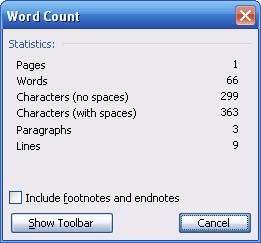
The only way to access readability statistics is by performing a spelling and grammar check with the readability option checked. You can, however, get a word count by clicking Tools and clicking Word Count. That command will show this window:
You can see from the sample that this displays basic statistics about the number of words, pages, characters, paragraphs, and lines in your document. You can also choose to include or exclude footnotes and endnotes.
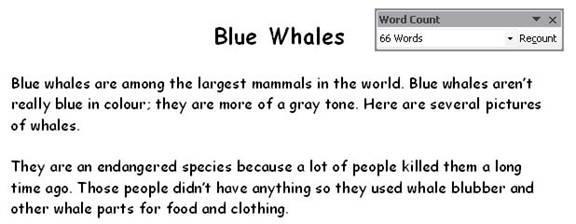
If you need to keep track of how many words you’re writing, click the Show Toolbar button. This button will bring a toolbar up on your screen. It will show how many words you have typed (before you clicked Word Count), and will display that number until you start typing again. When you do start typing again, you can click the Recount button on the toolbar. Here’s an example:
Just like other toolbars, you can move the Word Count toolbar by dragging and dropping it, or close it using the X in the top right hand corner.
|