|
1. |
Open
Microsoft Office Word 2003. |
|
|
|
|
2. |
Open the Blue
Whales document from the sample files. |
|
|
|
|
3. |
Click the
Tools
menu and click
Spelling and Grammar.
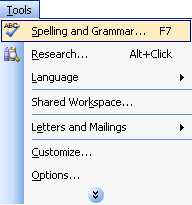
Uncheck the box
Check Grammar. |
|
|
|
|
4. |
For the first
spelling mistake found, click
among
in the suggestions box and click
Change.
For any further
spelling mistakes, make the changes you think are appropriate. |
|
|
|
|
5. |
When the spelling
check is complete, right-click on the word
is
in the sentence “Here
is several pictures of whales.”
Click the word
are
in the suggestions menu. |
|
|
|
|
6. |
Follow the same
procedure with the other grammatical errors: right-click on each
of them and make the appropriate changes. |
|
|
|
|
7. |
Click the
Tools
menu and click
Spelling and Grammar.
Click the
Options
button. 
In the Grammar
section of the Options window, check
Check Grammar with
Spelling
and
Show
readability statistics.
Under Writing Style, choose
Grammar and Style.
Click
Recheck Document.
Click Yes
to the warning and click
OK. |
|
|
|
|
8. |
Press the
F7
key on your keyboard. Go through the spelling and grammar check
to make sure you didn’t miss anything.
When the statistics
show, write down how many words you have in
your document. |
|
|
|
|
9. |
Re-read your
document to make sure everything is correct. Make any changes
that you think are necessary. |
|
|
|
|
10. |
Save your document
to the desktop
as
Blue Whales.doc. |


