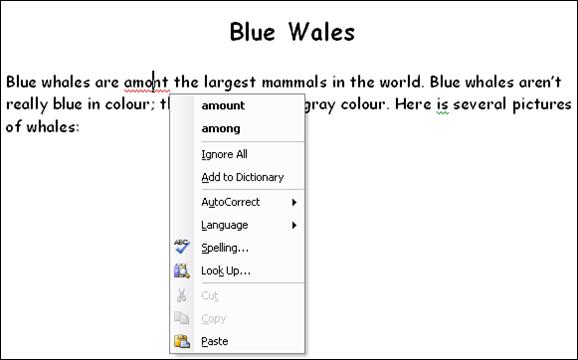
If automatic spelling and grammar check is turned on, you will be notified when your text is identified as misspelled or grammatically incorrect. Misspelled words have a red wavy line under them while grammar problems have a green wavy line, like this:
You can right-click on an incorrect element to have options to change it, without running a complete spelling and grammar check. Here’s what would happen if we right-clicked on the misspelled word in the document above:
Let’s look at each option in the right-click menu (called a context menu because it changes depending on what you right-click on). Just like any other menu, you can perform the command by clicking on it.
The first two items (amount and among) are suggestions for the misspelled word. You can identify suggestions because they are always in bold in the right-click menu. The next three options (Ignore All, Add to Dictionary, and AutoCorrect) are the same ones we had in the main spelling dialog. You can also set your language using the Language menu. Next, you can click the Spelling button to run a full spelling only check. Or, you can click Look Up to search for the dictionary in the research pane. (We’ll talk more about the research pane in the Intermediate lessons.) The next three options are cut, copy, and paste, which we already know how to use.
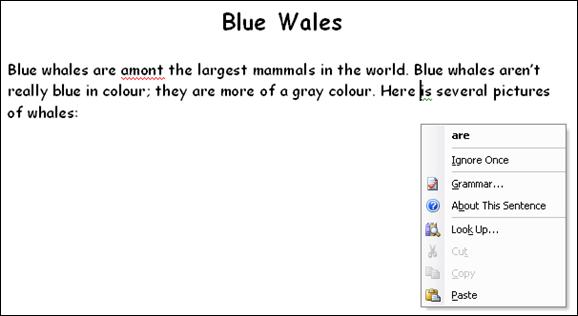
The context menu for a grammatical error is similar:
Once again, we have suggestions in bold at the top of the menu. We also have the option to ignore this error (Ignore Once), or to run a full grammar only check (Grammar). You can also learn more about this grammatical concept by clicking About This Sentence or Look Up. And, last but not least, we have our old friends cut, copy, and paste.
So, if you have an underlined item in your document, right-click to see these options. You can click any command to perform that action, or just click back in your document to make the menu go away. You can right-click an underlined element at any time to see suggestions that are relevant to fixing that particular problem.
|