Have you ever typed a long title just to realize it should be all in caps? Or typed a paragraph just to realize that your caps lock was on, SO YOUR WHOLE PARAGRAPH LOOKS LIKE THIS. (Oops!)
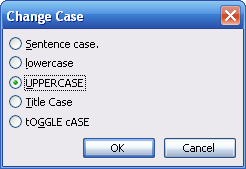
Luckily, there’s a quick, easy way to change your font case. First, select the text that you want to change. Then, click the Format menu and click Change Case. You’ll see this dialog box:
You’ll see the five font options. Each option is typed in the case they represent, so it’s easy to pick what case style you need. Once you’ve clicked the case you want, click OK and it will be applied to your text.
|