|
1. |
Open
Microsoft Office Word 2003.
(If you already have Word open, press Ctrl + N to create a blank
document.) |
|
|
|
|
2. |
Type the following
text:
Christmas Party Ideas
Press Enter, then
type:
Sue came up with the idea of having our annual party at a
bowling alley. Jane also sent me an e-mail with the same idea;
she said the Bowl–A-Rama has some great prices and deals. |
|
|
|
|
3. |
Select the sentence
Christmas Party Ideas. |
|
|
|
|
4. |
Click the
Format
menu and click
Font.
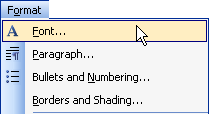
Change the Font
Type to
CopperPlate Gothic Light.
Set the Font Style
to Bold.
Change the Font
Size to 24.
Change the Font
Colour to
green. |
|
|
|
|
5. |
Click the
Text Effects
tab.
Click
Marching Red Ants.
Click
OK. |
|
|
|
|
6. |
After the word
deals, press Enter twice. |
|
|
|
|
7. |
Click the Font menu
(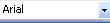 ) on the
formatting toolbar. ) on the
formatting toolbar.
For your
font, type
Garamond, or choose
that font from the list. Make sure the font size says 12. |
|
|
|
|
8. |
In your document,
type
The date for our Christmas party has been set for December 14. |
|
|
|
|
9. |
Save
your document to your desktop as Christmas Party Ideas. |


