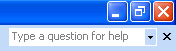
In the top right hand corner of your screen, under the close button, you will see this box:
This is a really quick way to get help. It’s kind of like asking the Office Assistant for help: you just type your question in the box and hit the Enter key on your keyboard. A task pane will open to the right of your screen and your results will be displayed. Remember that results act the same no matter where you launch help from, so just click the links in the task pane to see those help topics.
|