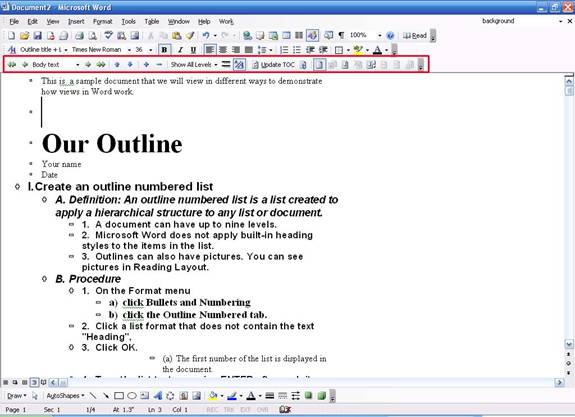
As you might have guessed, Outline view is best used when creating outlines. We haven’t talked about how to create this type of document yet, so don’t worry about the outlining tools right now. Basically, an outline is a structured document with various headings and sections. It’s a great way to organize reports and other long documents.
Outline view lets you customize your view based on that structure. Graphics, objects, backgrounds, and rulers are all hidden in Outline view. You can use the Outlining toolbar (which will be added to your view) to move to various levels in your document. We’re not going to get into specifics about this toolbar right now, but let’s look at a sample.
This is the same sample document we’ve been looking at all along, but you can see that it looks very different. (The Outlining toolbar is circled in red, just so you can see the various options. You can see that you can easily navigate to various levels using the Show All Levels menu in the middle.)
Let’s move onto our next type of view: Full Screen.
|