|
1. |
Make sure
Microsoft Office Word 2003
is closed.
Click the
Start
menu, click
Programs
(or All Programs), and click
New Office Document. |
|
|
|
|
2. |
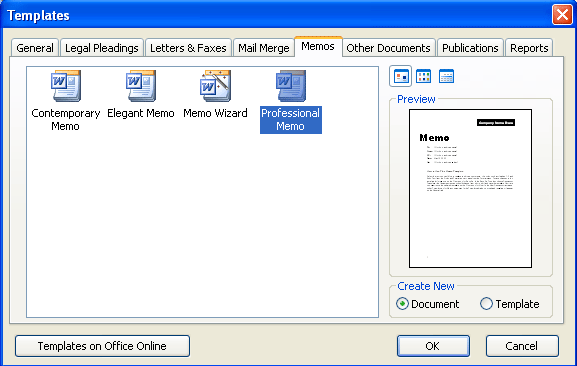
Click the
Memos
tab. Click
Professional Memo
and click OK.
|
|
|
|
|
3. |
In the memo
template, fill in this information in the corresponding fields:
Company Name Here:
Acme Company Inc.
To:
Wile E. Coyote
From:
Your name
CC:
Mr. R. Roadrunner
Re:
Roadrunner traps |
|
|
|
|
4. |
Delete all the
information in the memo body (below the vertical line). Type
this text:
We regret to inform you we will not be able to fulfill your
order for roadrunner traps as we had promised. Roadrunners are
an endangered species and we no longer sell this product. Please
contact our sales department at 1-888-CAL-ACME if you have any
questions. |
|
|
|
|
5. |
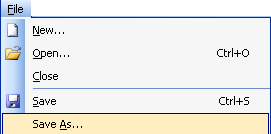
Click the
File
menu and click
Save As.
Save the file to
your desktop.
Name it
Acme Memo.
Leave the file type as .doc. |
|
|
|
|
6. |
Click the
File
menu and click
New.
In the New Document task pane, type
letter
in the Search
dialog box. Click
Go. |
|
|
|
|
7. |
Scroll through the
results pane until you find
Letter to Santa.
Click this result,
and in the template preview box, click
Download. |
|
|
|
|
8. |
In the editing
window, select the list of three items (A
new bike, A pogo stick, Some puzzles). Delete it and type:
Put my wish list here!
Also delete the
text that says Your Name and type
Wile E. Coyote. |
|
|
|
|
9. |
Click the
File
menu and click
Save As.
Change the document
type to .dot
(using the Save As Type drop-down menu at the bottom of the
window).
For the file name,
type
Letter to Santa.
Click
Save. |
|
|
|
|
10. |
Close
Microsoft Office Word
2003. |


