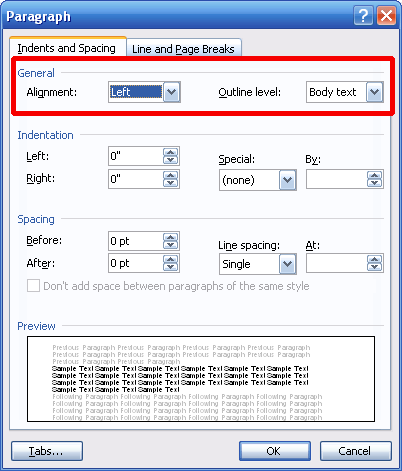
You can change a paragraph’s alignment by clicking the Format menu and clicking Paragraph. In here, there are sections for general options, indentation, spacing, and preview.
We have two drop-down boxes in the general section. The first is for alignment. You can use the drop-down menu (in the sample Left is selected) to align your paragraph to the left, to the right, in the centre, or justify it. (Remember that justification spreads out your text so that the left and right margins are even.)
So, once you’ve selected your alignment choice, just click OK for it to be applied.
You can apply alignment the same way you apply formatting. You can either set your alignment options in the Paragraph dialog box before you start typing, or you can place your cursor anywhere in the paragraph after it has been typed and set the options. Of course, you can come back at any time and change your selections.
|