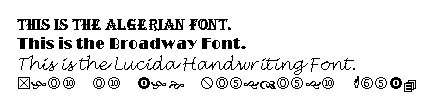
A font is a complete set of characters (with typeface and style) that you use to type. Here are some examples of fonts:
Some fonts are all capitals. Other fonts are all symbols. Fonts are really customizable: you can change their size, type, colour, spacing, and effects. The fonts that you have available in Word depend on what other applications you have installed, and if you have installed any third-party font packages. The most commonly used fonts are Times New Roman, Tahoma, Arial, and Courier New. Remember that font settings (types, sizes, effects, spacing, etc.) are like other formatting: you can either turn it on to have the next text you type use that font type and size, or you can select text you’ve typed already and apply that formatting to it. Let’s take a look at how to use fonts in Word.
|