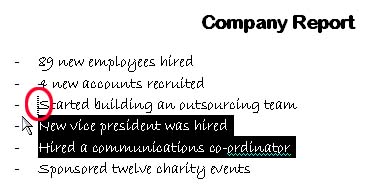
Another way to move text is to drag and drop it. This method is really easy: - Select the text you want to move, - Hold down your left mouse button, - Move your mouse until the cursor appears where you want the text to be, - And let go of the left mouse button.
Have a look at this example:
In the sample above, we selected lines four and five. Then, we moved our mouse to the beginning of line three. (You can see that the actual cursor moved as well; it’s circled in red in the sample above.)
Once we released the mouse button, this is what our document looks like:
The text we moved is still selected, and we also have that paste icon to change paste options. Just click anywhere to deselect your text. That’s all there is to moving text using drag and drop!
|