|
1. |
Open
Microsoft Office Word 2003. |
|
|
|
|
2. |
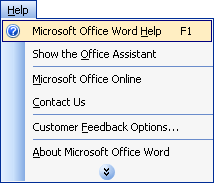
Click the
Help
menu and click
Microsoft Office Word Help.
 |
|
|
|
|
3. |
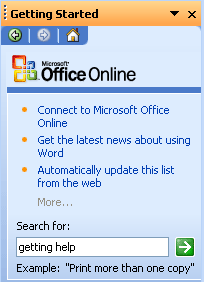
In the task pane on
the right hand side, type
getting help
in the Search
For
box. Then, press enter or click the
green arrow.
 |
|
|
|
|
4. |
In the search
results, click
Print a Help Topic. |
|
|
|
|
5. |
Click the Print
button in that help result.
Then, use the red
X
to close out of the result.
Click the
X
in the help task pane as well. |
|
|
|
|
6. |
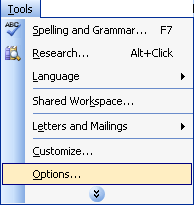
Click the
Tools
menu and click
Options.
Click the Help
icon
in the top right hand corner of the screen.
 |
|
|
|
|
7. |
Use the red
X
to close out of the result that opens.
Cancel
out of the options window. |
|
|
|
|
8. |
Click the
Help
menu and click
Show Office Assistant.
|
|
|
|
|
9. |
Right-click on the
Office
Assistant
and click
Choose Assistant. |
|
|
|
|
10. |
In the Gallery,
click Next
until you find an Office Assistant that you like. (You can also
click the Back
button to go back in the list.) Click
OK
once you’ve made your choice. |


