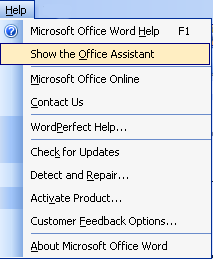
As you might have guessed, the Help menu is one of the best ways to get help. For now, we’re just going to get an overview of each option in the menu. We’ll also talk about the most important components in a moment.
The first item, Microsoft Office Word Help, will open a task pane on the right hand side of the screen to give you several ways to get help. The second option will show the Office Assistant (or hide him if he’s already shown). The third option, Microsoft Office Online, opens http://office.microsoft.com, the Office Web site. This web site has lots of great tools, downloads, and helpful resources. The fourth option, Contact Us, takes you to the support section of the Office Online page. This page offers you contact options for support, questions, and feedback.
The next option, WordPerfect Help, is a quick list of common WordPerfect commands and their corresponding commands. Even if you’re not a WordPerfect user, this can be a good way to familiarize yourself with shortcuts and common commands in Word.
The next set of options is mainly focused on technical aspects of the program. You can check for updates on the Microsoft Web site, perform a Detect and Repair to fix any problems you’re having, or activate the product. You can also set your online content, feedback, and SharePoint options using the Customer Feedback Options command. Last but not least, click on About Microsoft Office Word to get technical information about the program.
Let’s take a closer look at the first option: Microsoft Office Word Help.
|