|
The last set of options in the
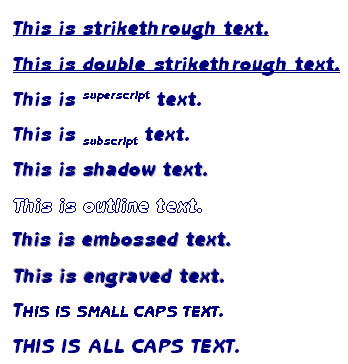
Font tab of the Fonts dialog box is Effects. This allows you to apply
various effects to your fonts. Let’s take a look at each of these
options.
- Strikethrough
places a line through your text.
- Double
strikethrough places two lines through your text.
- Superscript
places letters or numbers above normal text.
- Subscript places
letters or numbers below normal text.
- Shadow places a
shadow around your text.
- Outline makes
your text look outlined.
- Emboss gives a
raised look to your text.
- Engrave makes
your text look imprinted in the screen.
- Small Caps puts
all your text in capital letters. Letters that would normally appear
capitalized (like the beginning of sentences look larger).
- All Caps puts all
your text in capital letters, as if you had used caps lock.
- Hidden hides
selected text.
Just like the basic formats
(bold, italics, and underline), you can combine any or all of these
effects to make your document unique. Select the effects that you want
and click OK to apply them! |


