Once you’ve got all those documents open, how do you close them? There are a few ways to do so; you should use the one that you find easiest.
If you’re in a document and you want to close it, just click the File menu and click Close. Or, click the small X below the large X in the top right hand corner of the screen. (You can see a sample on the right). You can also use the Alt + F4 keyboard shortcut to close the office program.
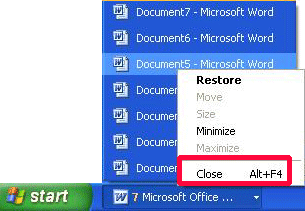
If you’re not in the document, you can right-click the document on the taskbar and click Close:
This technique also works if the documents are grouped. Just click the grouped item and right-click the document you want to close.
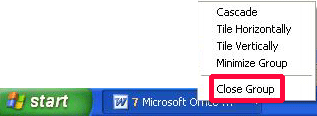
You can close all grouped documented by right-clicking on the grouped item in the taskbar too. No matter where you close a document from, if you have not saved the document you will be prompted to do so.
|